Letterhead Template
Free, print-ready templates for every size and option of our letterheads, with the bleed, trim and safe area marked, and the folds, cut lines and page labels where your product has them.
About this template
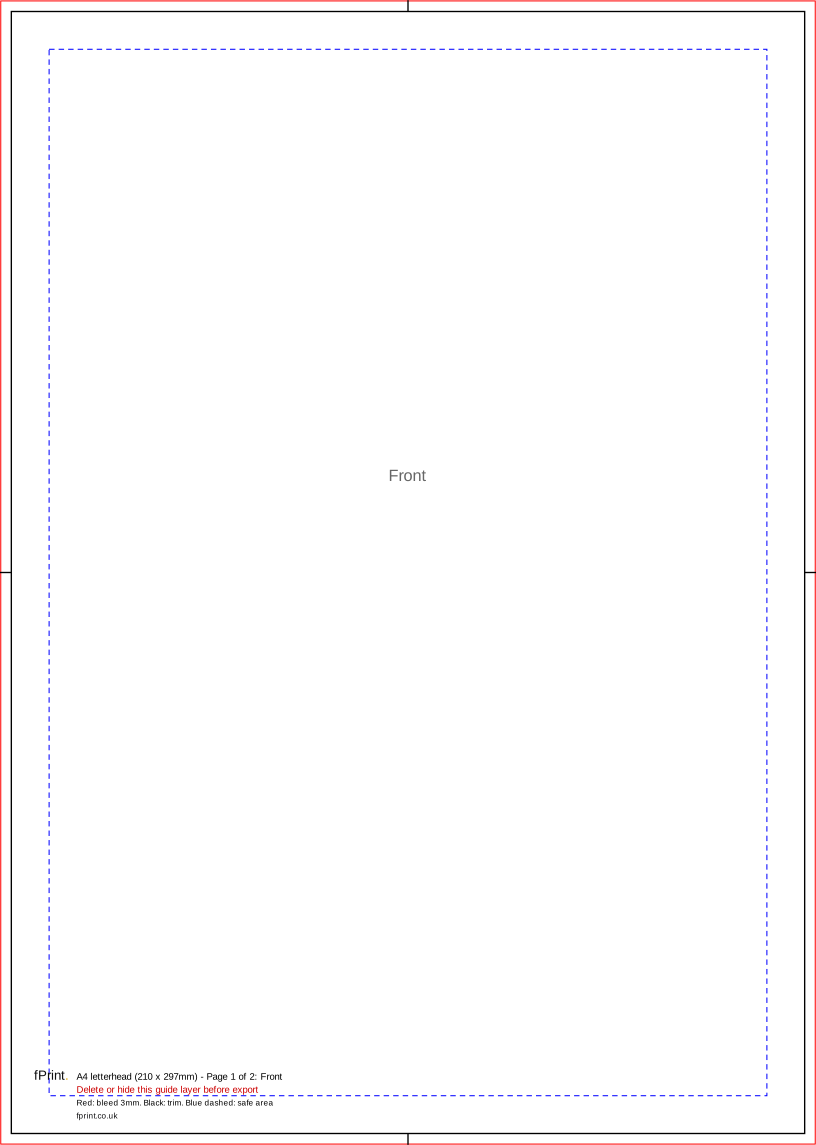
Our letterhead template is an A4 page, 210 x 297mm, with 3mm of bleed on every side, so the file is 216 x 303mm. Keep your logo, address and other details at least 10mm inside the trim, in a header at the top and, if you want one, a footer at the bottom.
Leave the middle of the page clear. That is where your letters are typed or printed later, on your own office printer. Our letterheads are printed on 120gsm uncoated, laser-safe paper, so they go through office laser printers and you can sign them with a pen.
The template has two pages. Page 1 is the front of the letterhead. Page 2 is the back, for double-sided letterheads only, which some businesses use for terms or a list of branches. For single-sided letterheads, supply page 1 only.
If your header colour or image runs off the edge of the paper, take it out to the red bleed edge. Download the PDF for Illustrator, InDesign or Affinity, or the SVG for Canva or Inkscape. Delete or hide the guide layer before you export, then upload your PDF on the letterheads page. A limited company's letters must show certain details, set out in Part 6 of the Company, Limited Liability Partnership and Business (Names and Trading Disclosures) Regulations 2015. Our guide to what a company letterhead must show explains them.

A4 letterhead (210 x 297mm)
| Trim size | 210 x 297mm |
|---|---|
| Artwork with bleed | 216 x 303mm |
| Bleed | 3mm |
| Safe area | 10mm inside the trim |
| Pages | 2 |
| Formats | PDF, SVG, Word (DOCX) |
Page 1 is the front and page 2 the back; for single-sided letterheads supply page 1 only. Each page is 216 x 303mm with 3mm bleed. Keep your design to the header and footer, 10mm inside the trim, so the letter fits in between.
Size for Canva, Word and other apps
The artwork size is the trim size plus the bleed on every side. Use it as the custom size (in millimetres) when you set up a design without our file, and keep text inside the safe area.
| Template | Trim size | Artwork with bleed (custom size) | Bleed | Safe area |
|---|---|---|---|---|
| A4 letterhead (210 x 297mm) | 210 x 297mm | 216 x 303mm | 3mm | 10mm inside the trim |
What's in the file
| Mark | Colour and line | What it means |
|---|---|---|
| Bleed edge | Red, thin solid line round the edge of the page | Colour that runs off the paper goes to here. This 3mm strip is trimmed off. |
| Trim line | Black, solid line at 210 x 297mm, with short black centre marks in the bleed | The edge of the finished A4 sheet. |
| Safe area | Blue, short dashes, 10mm inside the trim | Keep your logo, address and details inside this line. |
| Page label | Grey text, "Front" or "Back" | Which side of the letterhead the page is. |
| Label block | Black and red text near the bottom edge | Template name, page number, legend and the reminder to delete the guides. |
Product notes
- Sizes: trim 210 x 297mm (A4); artwork 216 x 303mm with 3mm bleed; safe area 10mm inside the trim.
- Header and footer: put your design at the top and bottom of the page. A header of around a fifth of the page and a slim footer leave plenty of room for the letter.
- Typing area: the letter itself is added later in Word or your own software. Its margins need to clear your header and footer, so test-print a typed letter on plain paper and hold it against a proof of your letterhead.
- What to include: your business name, address, phone, email and website. Limited companies must also show their registered details on business letters; see our letterhead guide.
- Paper: 120gsm uncoated, laser-safe. Uncoated paper is easy to write on, and laser-safe paper is made for office laser printers.
- Matching stationery: our compliment slip template uses the same 3mm bleed, so you can reuse your header.
Using it in Word
Set a custom page size of 216 x 303mm with zero margins, place your header and footer artwork, and keep text 13mm from every edge (3mm bleed plus the 10mm safe area). Use Save as PDF to make the print file. To type letters on your printed letterheads later, use a normal A4 Word document and set the top and bottom margins so the text clears your header and footer.
Questions
What size is a letterhead template?
A UK letterhead is A4, 210 x 297mm. With 3mm of bleed on every side, the artwork file is 216 x 303mm. Keep logos and contact details at least 10mm inside the trim. If nothing in your design runs off the edge of the paper, you still need the full page size, but the bleed can stay white.
Can I type on the letterheads in my office printer?
Yes. Our letterheads are printed on 120gsm uncoated, laser-safe paper, made to go through office laser printers. Leave the middle of the page clear when you design it. Then set your Word margins so typed letters fit between your header and footer, and test on plain paper before you use the printed sheets.
What must a company letterhead show?
A limited company must show its registered name, the part of the UK it is registered in, its registered number and its registered office address on business letters, under Part 6 of the 2015 trading disclosure regulations. Sole traders and partnerships have separate rules. Our guide to what a company letterhead must show covers each business type, with sources.
Do I need a double-sided letterhead?
Most businesses don't. A single-sided letterhead, with your header and footer on the front, is the usual choice. A double-sided letterhead is useful if you want terms, a branch list or a design on the back. The template has a second page for this. For single-sided letterheads, send page 1 only.