Sticker Templates
Free, print-ready templates for every size and option of our stickers, with the bleed, trim and safe area marked, and the folds, cut lines and page labels where your product has them.
About these templates
We have sticker templates for three shapes: a 50mm circle, a 50 x 50mm square and a 55 x 85mm rectangle. Stickers need more bleed than paper products: 5mm on every side, so the round and square files are 60 x 60mm and the rectangle file is 65 x 95mm. Keep text and detail 3mm inside the cut line.
On the round sticker template, the black circle is the 50mm cut line. Fill the whole square page with your background, right out to the red edge, even though only the circle is kept. If your background stops at the circle, any small movement in cutting shows a white rim.
Keep text and logos inside the blue dashed circle, 3mm in from the cut, so nothing is clipped. The square and rectangle stickers have square corners, with the same 5mm bleed and 3mm safe area.
Download the PDF for Illustrator, InDesign or Affinity, or the SVG for Canva or Inkscape. Delete or hide the guide layer before you export, then upload your PDF on the stickers page. You don't need to draw a cut line yourself: the template shows where we cut.
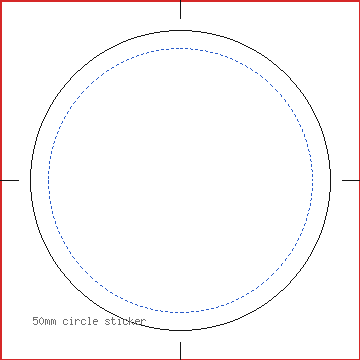
50mm circle sticker
| Trim size | 50 x 50mm |
|---|---|
| Artwork with bleed | 60 x 60mm |
| Bleed | 5mm |
| Safe area | 3mm inside the trim |
| Pages | 1 |
| Formats | PDF, SVG |
The black circle is the 50mm cut line. Run your background 5mm past it, to the edge of the 60 x 60mm page, and keep text and detail inside the blue circle, 3mm in from the cut.


50 x 50mm square sticker
| Trim size | 50 x 50mm |
|---|---|
| Artwork with bleed | 60 x 60mm |
| Bleed | 5mm |
| Safe area | 3mm inside the trim |
| Pages | 1 |
| Formats | PDF, SVG |
Square corners. The page is 60 x 60mm with 5mm bleed; keep text and detail 3mm inside the cut line.


55 x 85mm rectangle sticker
| Trim size | 55 x 85mm |
|---|---|
| Artwork with bleed | 65 x 95mm |
| Bleed | 5mm |
| Safe area | 3mm inside the trim |
| Pages | 1 |
| Formats | PDF, SVG |
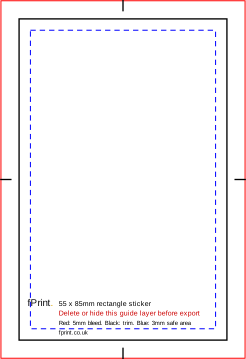
Square corners. The page is 65 x 95mm with 5mm bleed (turn it for landscape); keep text and detail 3mm inside the cut line.
Sizes for Canva, Word and other apps
The artwork size is the trim size plus the bleed on every side. Use it as the custom size (in millimetres) when you set up a design without our file, and keep text inside the safe area.
| Template | Trim size | Artwork with bleed (custom size) | Bleed | Safe area |
|---|---|---|---|---|
| 50mm circle sticker | 50 x 50mm | 60 x 60mm | 5mm | 3mm inside the trim |
| 50 x 50mm square sticker | 50 x 50mm | 60 x 60mm | 5mm | 3mm inside the trim |
| 55 x 85mm rectangle sticker | 55 x 85mm | 65 x 95mm | 5mm | 3mm inside the trim |
What's in the file
| Mark | Colour and line | What it means |
|---|---|---|
| Bleed edge | Red, thin solid line round the edge of the page | Backgrounds run to here. The 5mm outside the cut is trimmed off. |
| Cut line | Black, solid line: a circle on the round sticker, a rectangle on the others | The shape the sticker is cut to. |
| Safe area | Blue, short dashes, 3mm inside the cut (a circle on the round sticker) | Keep text, logos and fine detail inside this line. |
| Centre marks | Short black lines in the bleed, at the middle of each side | Help you centre your design. |
| Label block | Small black and red text near the bottom edge | Template name, legend and the reminder to delete the guides. |
Product notes
| Shape | Cut size | Artwork with 5mm bleed | Safe area |
|---|---|---|---|
| Round | 50mm circle | 60 x 60mm | 44mm circle (3mm in) |
| Square | 50 x 50mm, square corners | 60 x 60mm | 44 x 44mm |
| Rectangle | 55 x 85mm, square corners | 65 x 95mm | 49 x 79mm |
- Bleed is 5mm, not 3mm. If your file only has 3mm, our automatic check will flag it.
- Resolution: 300dpi at full size, which is 709 x 709 pixels for the round and square files and 768 x 1122 pixels for the rectangle.
- Borders: avoid a thin ring or frame close to the cut line. On something this small, a slight shift in cutting makes it look uneven.
- Material: the template is the same for every material. White plastic (our standard) is water- and tear-resistant; white PVC and clear plastic are recommended for outdoors; gloss, matt, recycled gloss and kraft paper are for dry, indoor use. Clear plastic has no white ink, so white areas print clear.
- Sheets: for the same stickers supplied together on sheets, use our sticker sheet templates.
Using it in Canva
Canva's Show print bleed adds about 3mm, which is not enough for stickers. Instead, create a custom-size design at the full artwork size (60 x 60mm for round and square stickers, 65 x 95mm for the rectangle), with Show print bleed off. Upload our SVG, stretch it to fill the page as a guide, delete it when you have finished and download as PDF Print.
Questions
How much bleed do stickers need?
5mm on every side, more than the 3mm used on leaflets and cards. Stickers are cut to shape, and the extra bleed means your background still reaches the cut if it moves slightly. That makes the round and square files 60 x 60mm and the rectangle file 65 x 95mm.
How do I make a round sticker if my design program only does rectangles?
Design on the square 60 x 60mm page and fill it edge to edge with your background. Use the black circle in our template to place your design, and keep text inside the blue dashed circle. We cut the circle ourselves, so you don't need to make a circular file or remove the corners.
Are your stickers waterproof?
It depends on the material you choose. Our standard white plastic is water- and tear-resistant and suits indoor and outdoor use, and white PVC and clear plastic are recommended for stickers that stay outdoors. Paper stickers (gloss, matt, recycled gloss and kraft) are for indoor use on dry surfaces. The template is the same whatever material you choose.
Can I use the 55 x 85mm template in landscape?
Yes. Turn the page round so it is 95mm wide and 65mm tall, and design in landscape. The bleed, cut line and safe area are the same, just rotated. Our file check reads the size either way. Order the 55 x 85mm rectangle size whichever way round your design is.